I started experimenting more in Unity. First, I worked on converting some point cloud stuff I was doing in TouchDesigner to Unity's compute shaders. The screen capture didn't come out too well, but it runs at about 100fps.
I also started building a whip weapon in the style of Dr. Strange-meets-vaporwave. It really needs to be in VR for the full effect.
29 June 2017
12 April 2017
Melange dev
Some quick videos showing my Masters project, Melange. The strings are used as waveforms to sonify the fluid field.
Strings visible:
Turning up string velocity feedback:
Strings visible:
Turning up string velocity feedback:
10 April 2017
150 Media Stream
Last month I flew to Chicago to get my piece Cirrus running on 150 Media Stream. The LED wall is 150' x 22' and runs four 4k streams across five computers. Cirrus is a live real time fluid dynamics + reaction-diffusion simulation.
Videos are sped up 5x.


19 March 2017
Spring-mass GLSL
This spring-mass system was adapted to the GPU in GLSL from Paul Bourke's example. I'm using it to sonify the fluid in a way that allows for more structure and flexibility than directly sampling the velocity field. I'll post more about this technique in the future.
The system uses a 1024 x 4 texture map with simple one-dimensional spring connections that bind each pixel to its horizontal neighbor, forming 4 lines. I extended Paul's example to include an anchor force which pulls the particles back to a rest position (in this case concentric rings), and an impulse force that applies velocity from an outside source.
layout(location=0) out vec3 fragColorPosition;
layout(location=1) out vec3 fragColorVelocity;

uniform float dt;
uniform float springConstant;
uniform float restLength;
uniform float dampingConstant;
uniform float viscousDrag;
uniform float anchorForce;
uniform float impulseForce;
uniform float mass;
uniform float fluidLengthThreshold;

vec2 springs[2] = vec2[2](vec2(-1.,0.), vec2(1.,0.));

const int POSITION_OLD = 0;
const int VELOCITY_OLD = 1;
const int VELOCITY_NEW = 2;
const int ANCHOR = 3;

const float smallf = 0.000001;

void main() {

    // Calculate forces
    vec3 pos0 = texture(sTD2DInputs[POSITION_OLD], vUV.st).xyz;
    vec3 vel0 = texture(sTD2DInputs[VELOCITY_OLD], vUV.st).xyz;
    vec3 vel_new = texture(sTD2DInputs[VELOCITY_NEW], pos0.xy).xyz;
    vec3 anchor = texture(sTD2DInputs[ANCHOR], vUV.st).xyz;
    vec3 force = vec3(0.);

    force -= viscousDrag * vel0;
    force += vel_new * dt * dt * impulseForce;
    force += (anchor-pos0) * anchorForce;

    // spring interaction
    // 1d horizontal connection
    float cellSize = uTD2DInfos[POSITION_OLD].res.x; // 1/width

    for (int i = 0; i < 2; i++) {
        vec2 offset = vec2(cellSize, 0.);
        offset *= springs[i];
        vec2 coord = vUV.st + offset;

        if (coord.x < 0.) coord.x = 1.-cellSize;
        if (coord.x > 1.) coord.x = 0.+cellSize;

        vec3 pos1 = texture(sTD2DInputs[POSITION_OLD], coord).xyz;
        vec3 vel1 = texture(sTD2DInputs[VELOCITY_OLD], coord).xyz;

        vec3 dx = pos0 - pos1;
        float len = length(dx) + smallf;

        vec3 f = vec3(springConstant * (len - restLength));
        f += dampingConstant * (vel0 - vel1) * dx/vec3(len);
        f *= -dx/vec3(len);

        force += f;
    }

    // Apply derivative
    vec3 dpdt = vel0;
    vec3 dvdt = force/vec3(mass);

    pos0 += dpdt * dt;
    vel0 += dvdt * dt;

    fragColorPosition = pos0;
    fragColorVelocity = vel0;

} //main
19 February 2017


12 February 2017
150 Media Stream
Pieces are coming together for the media wall installation in Chicago. It has a website now:
150mediastream.com
Here are some photos of a test shoot of my fluid work that I'm now calling Cirrus. They only had one half of the display working:


150mediastream.com
Here are some photos of a test shoot of my fluid work that I'm now calling Cirrus. They only had one half of the display working:


06 January 2017
Fluid.tox, move to GLSL
While I was visiting Russia last year, I was alerted to a thread on the TouchDesigner forums about some people who had found touchFluid on Github and were struggling to get it to work. Part of that had to do with me omitting some files from the public repo due to the licensing language on those files (which I was later told is out of date and will be revised), but they were also getting stuck on setting up their CUDA environment correctly. I don't blame them, Touch is only compatible with an older version of CUDA and is difficult to install on newer systems. You have to jump through a bunch of hoops to get an old version of VS which still isn't quite old enough so you still have to force CUDA to talk to it so you can build a dll. I couldn't work on it remotely anyway since my laptop is a Mac.
On a whim one morning, I tried transcribing my code to GLSL in Touch. It went surprisingly fast and I got it working in a couple hours. It was also about four times faster.
I made a tough call to drop supporting CUDA and move forward with GLSL. The main thing I lost was the potential to implement Ted's wavelet turbulence on the GPU. This was something I wanted to do as soon as I got Stam's stuff working, but the math and engineering involved was making it slow sailing for this Bachelors of Fine Arts noggin. With an installation deadline looming, I wasn't making progress on the art side fast enough either. Shader development time is faster, they're more portable, easier to read (more "hackable"), and are more performant given my circumstances.
CUDA is incredibly powerful and has the potential to completely maximize NVIDIA GPU's. The problem essentially came down to my desire to continue learning its nuances.
Writing kernels in CUDA is pretty easy, but writing fast kernels is a lot trickier. A common technique to speed up bandwidth is to use their concept of shared memory, which is essentially just a cache that performs 100x faster than reading from the GPU's global memory. It makes sense, but the code is ugly as sin and further obfuscates the already confusing thread/block/grid indexing scheme one is forced to use when working with thousands of cores. My code could have benefited from shared memory because many kernels use a Von-Neumann grid to look up neighboring values, causing about 4x redundant global memory reads. The problem was exacerbated by the fact that my data was stored linearly, so I needed huge strides to look up neighbors above and below the current cell- the image width * 4 (the rgba channels). According to this official blog post about shared memory, bandwidth drops by 80% after a stride of just 4 and continues to decline after that. This is the graph that convinced me to at least try shaders:
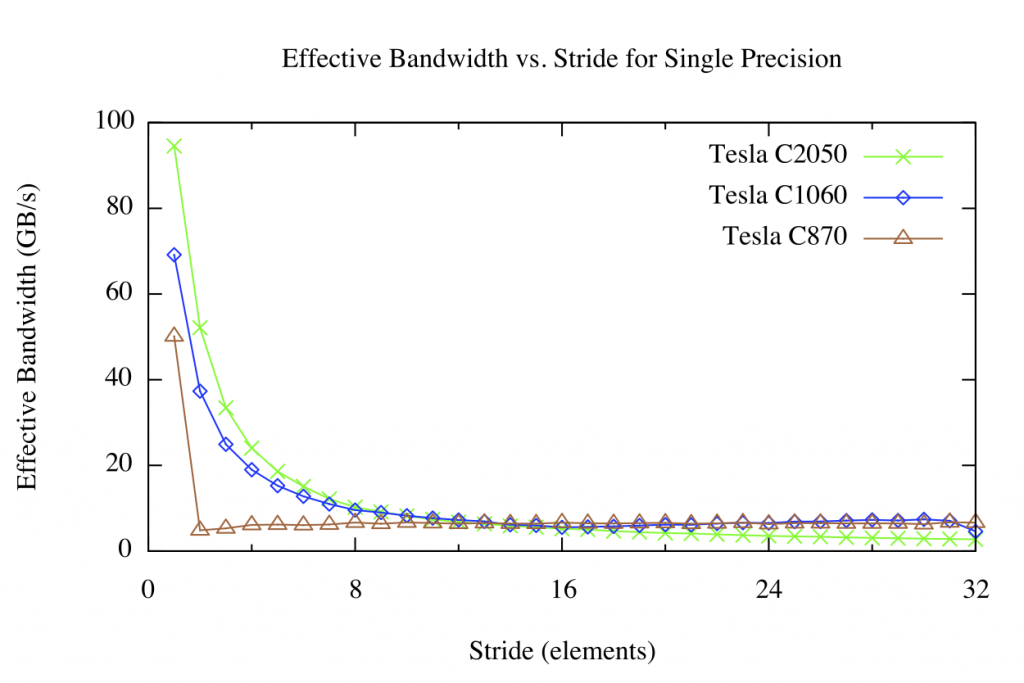
The speed boost I suspect comes from not having to deal with strides at all, instead encoding all the data into textures, which are optimized for random lookup.
Simulating using shaders is hardly a new thing. That, along with a few other oddities steered me away from them early on. You have to always be mindful that you are dealing with textures as a data structure so setting the filtering and format appropriately is crucial. They're also notoriously cryptic to debug, although that's slowly changing. Those are minor gripes when taking into account their ubiquity and accessible parallelism for visual media in general. The paradigm continues to advance with new hardware supporting things like dynamic tessellation and multiple camera matrices, and the community of users has never been stronger.
A couple months ago I wrapped everything up into a single tox, TouchDesigner's format for sharing snippets and single components, and put it on the forums to positive feedback. The CUDA repo lives on as a fork, but I'll continue working with the shader version from here on out.

05 January 2017
Hiatus
No posts for six months. I probably shouldn't be blogging.
My time has been split between traveling and working freelance. I wish I could post more about the project as it involves a lot of cool realtime graphics, but the NDA is real. Later this year I'll write something about it.
This summer I attended the Bridges math art conference in Jyväskylä, Finland to show my tiling work. The work has seen a decent run last year having been in Bridges, the End of Year Show, and the Computation and Expression show at the Art Design & Architecture Museum at UCSB.
More to come this year.

Art Design & Architecture Museum

Bridges, Finland
My time has been split between traveling and working freelance. I wish I could post more about the project as it involves a lot of cool realtime graphics, but the NDA is real. Later this year I'll write something about it.
This summer I attended the Bridges math art conference in Jyväskylä, Finland to show my tiling work. The work has seen a decent run last year having been in Bridges, the End of Year Show, and the Computation and Expression show at the Art Design & Architecture Museum at UCSB.
More to come this year.

Art Design & Architecture Museum

Bridges, Finland
30 June 2016
BCH Rotations
For about a year I've had a secret weapon I've been using in nearly all of my projects: a colorspace based in spherical coordinates called "BCH" which stands for Brightness, Chroma, Hue. It was described by Sergey Bezryadin and Pavel Bourov. There isn't much information available about it online, but these slides explain everything.
Everyday usage is similar to HSV, but BCH has many advantages. It is grounded in real-world light response according to the user's preferred standard white point reference (D65, D50, etc). The color is represented by a vector where the magnitude is the brightness, the inclination is the saturation, and the azimuth is the hue. The motivation behind its development was to have more realistic exposure and contrast adjustment control over low dynamic range images, such as standard JPEGs. I used this capability to great effect when performing Lukidus last year where it drove the realtime color correction of video micrography.

Since the color is a vector, hue is a rotation around 2 * pi. In the video above, the angle of the velocity is mapped to the hue and I modulate independent multipliers for the sine and cosine components of the rotation. These both start at 0, so we only see red, but as I open them up, more colors are introduced, eventually reaching a rainbow pattern (complete rotation), passing through interesting color palettes along the way. I'm really interested in exploring this colorspace further and have some ideas of different mappings that could benefit from it.
Here's a Shadertoy I made with a BCH implementation and comparison to HSV:
https://www.shadertoy.com/view/lsVGz1
EOYS
It's been a while since my last post. I've been recovering from the end of year show and working on doing wavelet turbulence up-resing on the GPU. Above is a video of some different presets that I'm cycling through and were used during the show.
I presented the current iteration as "Time Differential" and made an instruction manual for the Minilab that was printed and displayed next to the controller to solidify the idea that it is a video synthesizer. This was a quick and dirty 3d model I made in Houdini and rendered using wren.

An Apple Magic Trackpad 2 was used with multitouch input to add density and velocity. It wasn't exactly elegant, but it worked fairly well: I ran this really neat hack on my laptop which captures multitouch data and broadcasts them as OSC messages. A Processing sketch running along side it received the position and finger size information and sent them across an ad-hoc wifi network to my desktop, which Touch then assembled into a CHOP where 1 sample = 1 finger. That CHOP was then sent as an array to my shaders. It was surprisingly responsive and more or less reliable.
Overall it went pretty well with a good amount of interest and constructive feedback. The controller was available for the public to play with, and I've already made some changes to the knobs and layout as a result. A lot of people were interested in the sound-reactive capabilities of it which led to a lot of clapping and yelling. Plus, kids loved it, which is a good omen I guess.


09 May 2016
Tukey Window
This is a quick video demonstrating Tukey Windowing modulating the particle size using age as the input signal. Alpha (from the window function, not rgba) is set to .3 and it's been zoomed in to see the effect easier. Windowing the particle size will help ease transitions from particle birth and death so there's less noticeable pops. Here's some glsl code:
float tukeyWindow(float sig, float alpha) {
 if (alpha == 0.) // rectangular window
  return 1.;
 else if (sig < alpha / 2.)
  return 0.5 * (1. + cos(2.*3.1459265/alpha * (sig-alpha/2.)));
 else if (sig > 1.-alpha/2.)
  return 0.5 * (1. + cos(2.*3.1459265/alpha * (sig-1.+alpha/2.)));
 else
  return 1.;
}
Control

I've started integrating my Arturia Minilab to control various simulation parameters, inputs, and visualization options. Here is a quick video demonstrating the UI I've made that captures the midi signals for all of the knobs, pads, and sliders. Pads 1-4 select a different bank of knob settings, each with their own presets and color indicator. Values can be changed by both the controller and the on-screen UI. The keys work as well, but I'm focusing on these first as they will be the primary way of sculpting the behavior of the system. The keys will likely act as gates and triggers for adding new input (i.e. sound or image data).
24 April 2016
Particle trails
Messing around with feedback to get flow lines from the fluid sim. The color represents velocity direction and value is the magnitude of the velocity. Particles can bounce around obstacles and don't spawn inside them. 1 million particles @60 fps.
21 April 2016
GPU particles
Here's 250,000 particles being advected by the velocity field. This is being done using glsl shaders in TouchDesigner. The value of the particles is currently just the magnitude of the velocity, but I'll be adding a lot more color options later. I'm maintaining 60fps using a 512x512 fluid container.
I'm going to spend the next couple of weeks making big pushes in UI to prepare for a public demonstration at the end of year show. A lot to do still.
30 March 2016
Audio visualization, obstacle velocity
Here's a quick update that includes a couple new features: passing velocity in with obstacle data and rendering 3d geometry to a 2d image to use as input (although in this video, actual obstacles and density fields aren't present). I've got a simple particle simulation running on the CPU in TouchDesigner whose initial velocity and direction is being controlled by an audio waveform. I followed along with Derivative's 2016 Norway Workshop to get the system set up. Particle velocities are rendered as colors and piped into the CUDA sim. Adding these features went fairly smoothly.
Here it's very apparent that the simulation container doesn't have any interesting border conditions, which can be a good and bad thing. It's another feature to add. In the coming months, I'll be working on the UI, different composition techniques, experimenting with looks, and improving stability to prepare for MAT's End of Year Show. I've also become very interested in Ted's Wavelet Turbulence paper which would really send the visuals through the roof. No timeline on that yet, but it's going on the list.
16 March 2016
Boundaries and color
This update includes a lot of changes to the simulation algorithm as well as some new features. I ended up restructuring the velocity solve to mirror the one found in GPU Gems, which is still based on Stam's solution, but is more clear about the pressure and temperature fields, and simplifies the gradient subtraction a bit, so the performance is better.
For the reaction coupling, I diffuse two density fields with a laplacian kernel and apply the Gray-Scott equation, then advect them. Since there is a slight amount of diffusion from bilinear interpolation in the advection step, I suspect the Gray-Scott feed and kill values might be a little off. Nonetheless it appears stable. I'm passing a texture from Touch into cuda to define obstacles. The color is coming from the velocity, with hue mapped to its polar angle.
There are a lot of fields and variables to play with now. I'll have to decide if I want to start working on robustness and composition techniques, or to move forward with adding a particle system and pushing the resolution as far as possible.
28 February 2016
Tiling
I returned to some of my previous work on aperiodic tiles from two years ago. This time, I'm overlaying different iterations of the same prototile and rendering them as polygonal tubes with Mantra. Everything is done in Houdini with a little color correction in Photoshop. I'm trying to decide which ones to submit to Bridges this year.


25 February 2016
TouchDesigner + CUDA
I moved over to Windows and got reaction diffusion working in TouchDesigner using a CUDA .dll I adapted from my original experiments in Linux. This is a big checkpoint and hopefully represents the beginning of what will be the final environment and toolkit I will commit to for my thesis. Thinking of TouchDesigner as a modular OpenGL app authoring tool is extremely liberating.
I'm going to shoot for adding user-defined boundary conditions next as that seems to be coming up a lot lately. Color shouldn't be too far behind.
02 February 2016

Subscribe to:
Posts (Atom)